ResizeKit2.NET (for .NET Framework WinForms)
Supports .NET Framework 2.0 ~ 4.8
ResizeKit2.NET X (for .NET Core Windows Forms)
Supports .NET 5.0 ~ .NET 9.0
ResizeKit2 (for Delphi / C++Builder/ RAD Studio)
ResizeKit2 13 Florence Editions Are Now Available!
ResizeKit2 VB
Supports Visual Basic 6.0
Distribute enduser runtime applications free without additional fees or royalties!
 |
ResizeKit2.NET / ResizeKit2.NET X ResizeKit2 Delphi / ResizeKit2 C++Builder ResizeKit2 VB US$149.00 Single PC Developer's License ResizeKit2 RAD Studio (includes both Delphi/C++Builder) US$298.00 Single PC Developer's License 

|
All of the ResizeKit2 trial versions are fully functional and can be used to test the ResizeKit2 performance within your preferred development environment before you purchase the retail version. All ResizeKit2 trial versions display a nag screen when the form is resized. The ResizeKit2 .NET and ResizeKit2 .NET X trial versions stops working after 30 days.
* The ResizeKit2 VCL trial version downlad contains all VCL editions of the ResizeKit2 for all supported VCL programming environments. However, the ResizeKit2 retail versions are each sold separately. They require a separate license for each programming environment and are sold seperately. ResizeKit2 editions for Delphi XE2 and above and for C++Builder XE3 and above support 32 bit and 64 bit applications. All older ResizeKit2 editions support 32 bit applications only. For details, please contact questions@imagekit.com.
Just place the ResizeKit on your form!
The ResizeKit 2 is a control that automatically adjusts the size of the controls and fonts displayed on the form when the form size changes.
Programmers can write applications that adjusts the application appearance to size changes by the user,
often times without writing a single line of code.
The ResizeKit2 is easy to use, simply place the control on the form at design time. It can be used immediately from
the first day without changing the program design or code in your existing programs.
The ResizeKit2 VB is a fast and lightweight ActiveX control that supports VisualBasic 5.0 and 6.0. The ResizeKit2 Delphi and ResizeKit2 C ++ Builder, ResizeKit2 BDS,
and ResizeKit2 RAD Studio editions are VCL components for each supported VCL
development environment. The ResizeKit2.NET is a .NET Framework component for WinForm applications
that supports .NET Framework 2.0 ~ 4.8. The ResizeKit2.NET X
is for Windows Form applications and supports .NET 5.0 and above.
The
ResizeKit2 developer license allows the license holder to make as many runtime
applictions as they wish and, because the runtime license is free, the license
holder can distribute as many of each runtime application as they wish without
additional royalties or fees.
The ResizeKit2 can resize most standard control whose left, top, height, and
width properties are accessible to the control. Even some third party controls that do not
specify left, top, height, or width properties or controls in which these
properties are insulated from size changes can be resized by the ResizeKit. The
cells in Grid or Spread applications are some examples of this. In these cases,
the controls or fonts can be resized by specifying the dimensions of the control
or font in the ExitResize event. An example program illustrating the code
used in the ExitResize event is included with the ResizeKit.
Note: There are third party controls are can not be resized using the
ResizeKit2. Please download and test the ResizeKit2 trial version before you purchase the product.
The trial version is fully functional. If you have any questions, please contact questions@imagekit.com.
ResizeKit Main Features
- Automatically resizes all controls and fonts on the form.
- Simply place the Resize Control on the form. No need to redesign or add additional code.
- Maximum and minimum form height and width can be specified.
- Initial location of the form can be specified.
- Controls and fonts can also be excluded from resizing.
- Runtime royalty-free license. Distribute unlimited applications.
- The ResizeKit2 .NET is a Windows Form .NET Framework component with both .NET2.0 and .NET4.0 assemblies
- The ResizeKit2 .NET X is a Windows Form component that supports .NET 5.0 and above
- The ResizeKit ActiveX component is based on ATL so it is fast and lightweight.
- The ResizeKit VCL component has unified .EXE so applications can be distributed in one simple unit.
- Resizes most third party controls without the need for additional code.
- Contains easy to use properties and its ExitResize event allows you to customize the resize process.
- Useful sample programs are included.
 The ResizeKit2 .NET / ActiveX / VCL Component
Set the initial position and size of the form (VB, VCL version only); set whether or not to resize fonts; specifiy the maximum or minimum allowable size for the form, etc. using custom properties. Simply paste this ResizeKit control on the form and the default properties will be set. In most cases, these values can be used as it is with no adjustment. The ResizeKit2 VB provides ActiveX controls, the ResizeKit2 Delphi / ResizeKit2 C ++ Builder / ResizeKit2 BDS / ResizeKit2 RAD Studio provides VCL components, and the ResizeKit2 .NET / .NET X provides .NET components.
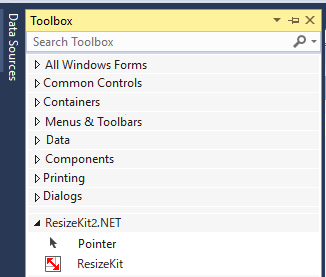
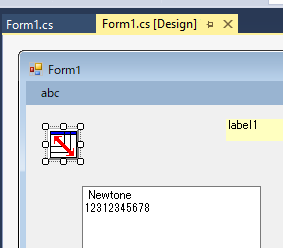
Simply add the ResizeKit Component to your form at design time and you are good to go! (ResizeKit2.NET example)
| The ResizeKit Component in Toolbox | The ResizeKit Component on Form |
|
 |
 |
Example: Reducing the size of the form during execution (ResizeKit2.NET example)
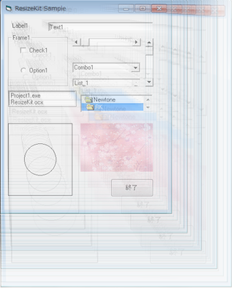
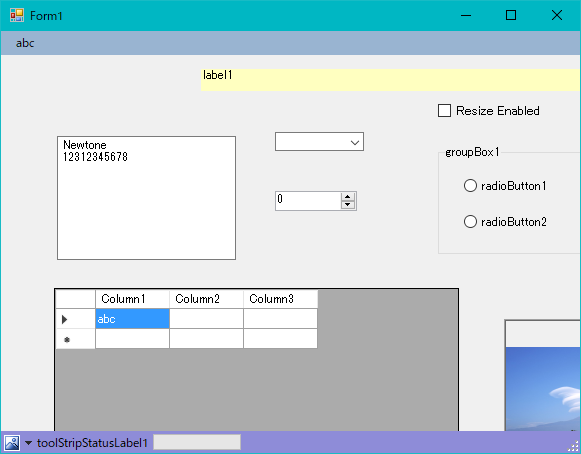
If you reduce the size of your form without using the ResizeKit, the controls and fonts on your form are hidden beyond the form's right side and bottom borders.
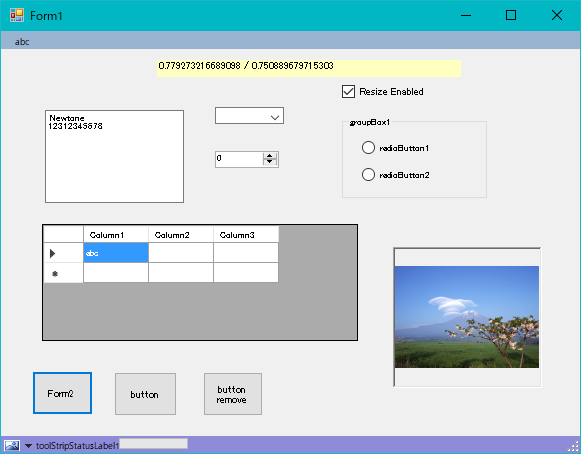
By simply placing the ResizeKit on your form, the size of the controls and fonts automatically changes with changes in the size of the form. All controls and fonts appear in the same proportion as the original form
In some cases, controls or fonts cannot be automatically resized. Third party controls that do not specify left, top, height, or width properties or controls in which these properties are insulated such as the cells in Grid or Spread applications are some examples. In this case, these controls or fonts can be resized by specifying the dimensions of the control or font in the ExitResize Event. The ResizeKit includes sample programs to illustrate how to do this. * In the ResizeKit2 .NET, the size of the grid control and the font size in the cell are subject to resizing, but for the cell size use the "AutoSizeColumnsMode" and "AutoSizeRawsMode" properties of the control.
The ResizeKit2 allows you to set the position and size of the initial display of the form (VB, VCL version only), whether or not fonts are resized, the maximum and minimum sizes that the form can set.
Runtime License
Runtime applications, developed using the ResizeKit2, can be created and distributed without limit or additional royalties. However, this is limited to developers who hold a valid developer license for the ResizeKit2 and who have registered that license with us. To register please refer to our user registration page. Note that distribution of software created as "reusable components (ActiveX control, DLL, .NET, etc.)" using the ResizeKit2 requires a Redistribution license. For more information, please refer to our licensing page.
License Activation
For the ResizeKit2. NET and ResizeKit2 .NET X editions, activation (license authentication) is required. License activation confirms that the proper number of development licenses are being used. License activation is simple and takes a few seconds to perform. It is usually completed at the time the ResizeKit2 .NET and ResizeKit2 .NET X is installed, but activation can be delayed for up to 2 weeks after installation. If the license is not activated within this two week period the ResizeKit2 .NET and ResizeKit2 .NET X can not be used for developement until the license is activated.
* In order to activate license, Framework 4 or higher must be installed on your PC.
ResizeKit2 .NET X
| Product | Supported Containers | Supported Platforms |
| ResizeKit2 .NET X |
Visual Studio 2022 Visual Studio 2019 version 16.8 or later Supports .NET 5.0 and above Windows (WinForms) Forms applications only |
Windows 11 Windows 10 Windows 8.1 Windows Server 2022 Windows Server 2019 Windows Server 2016 Windows Server 2012 R2 Windows Server 2012 |
ResizeKit2 .NET
| Product | Supported Containers | Supported Platforms |
| ResizeKit2 .NET |
Visual Studio 2022 Visual Studio 2019 Visual Studio 2017 Visual Studio 2015 Visual Studio 2013 Visual Studio 2012 Visual Studio 2010 Visual Studio 2008 Visual Studio 2005 Supports .NET Framework 2.0 - 4.8 Windows Forms (WinForms) applications only |
Windows 11 Windows 10 Windows 8.1 Windows 8 Windows 7 Windows Server 2022 Windows Server 2019 Windows Server 2016 Windows Server 2012 R2 Windows Server 2012 Windows Server 2008 R2 |
ResizeKit2 Delphi / C++Builder / RAD Studio
| Product | Supported Containers | Supported Platforms |
| ResizeKit2 Delphi 13 Florence | Delphi 13 Florence for Win 32/64 |
Windows 11 Windows 10 Windows 8.1/ Windows 8 (Not uspported by 12 Athens or later) Windows Server 2022 Windows Server 2019 Windows Server 2016 Windows Server 2012 (R2) (Not supported by 12 Athens or later) Windows 7 (Not supported by 11 Alexandria or later) Windows Server 2008 (R2) (Not supported by 10.4 Sydney or later) Windows Vista (Not support by 10.1 Berlin or later) Windows Server 2003 (Not supported by 10 Seattle or later) WindowsXP (Not supported by XE6 or later) Windows2000 (Not supported by XE5 or later) |
| ResizeKit2 Delphi 12 Athens | Delphi 12 Athens for Win 32/64 | |
| ResizeKit2 Delphi 11 Alexandria | Delphi 11 Alexandria for Win 32/64 | |
| ResizeKit2 Delphi 10.4 Sydney | Delphi 10.4 Sydney for Win 32/64 | |
| ResizeKit2 Delphi 10.3 Rio | Delphi 10.3 Rio for Win 32/64 | |
| ResizeKit2 Delphi 10.2 Tokyo | Delphi 10.2 Tokyo for Win 32/64 | |
| ResizeKit2 Delphi 10.1 Berlin | Delphi 10.1 Berlin for Win 32/64 | |
| ResizeKit2 Delphi 10 Seattle | Delphi 10 Seattle for Win 32/64 | |
| ResizeKit2 Delphi XE8 | Delphi XE8 for Win 32/64 | |
| ResizeKit2 Delphi XE7 | Delphi XE7 for Win 32/64 | |
| ResizeKit2 Delphi XE6 | Delphi XE6 for Win 32/64 | |
| ResizeKit2 Delphi XE5 | Delphi XE5 for Win 32/64 | |
| ResizeKit2 Delphi XE4 | Delphi XE4 for Win 32/64 | |
| ResizeKit2 Delphi XE3 | Delphi XE3 for Win 32/64 | |
| ResizeKit2 Delphi XE2 | Delphi XE2 for Win 32/64 | |
| ResizeKit2 C++ Builder 13 Florence | C++Builder 13 Florence for Win 32/64 | |
| ResizeKit2 C++ Builder 12 Athens | C++Builder 12 Athens for Win 32/64 | |
| ResizeKit2 C++ Builder 11 Alexandria | C++Builder 11 Alexandria for Win 32/64 | |
| ResizeKit2 C++ Builder 10.4 Sydney | C++Builder 10.4 Sydney for Win 32/64 | |
| ResizeKit2 C++ Builder 10.3 Rio | C++Builder 10.3 Rio for Win 32/64 | |
| ResizeKit2 C++ Builder 10.2 Tokyo | C++Builder 10.2 Tokyo for Win 32/64 | |
| ResizeKit2 C++ Builder 10.1 Berlin | C++Builder 10.1 Berlin for Win 32/64 | |
| ResizeKit2 C++ Builder 10 Seattle | C++Builder 10 Seattle for Win 32/64 | |
| ResizeKit2 C++Builder XE8 | C++Builder XE8 for Win 32/64 | |
| ResizeKit2 C++Builder XE7 | C++Builder XE7 for Win 32/64 | |
| ResizeKit2 C++Builder XE6 | C++Builder XE6 for Win 32/64 | |
| ResizeKit2 C++Builder XE5 | C++Builder XE5 for Win 32/64 | |
| ResizeKit2 C++Builder XE4 | C++Builder XE4 for Win 32/64 | |
| ResizeKit2 C++Builder XE3 | C++Builder XE3 for Win 32/64 | |
| ResizeKit2 C++Builder XE2 | C++Builder XE3 for Win 32 ONLY! | |
| ResizeKit2 RAD Studio 13 Florence | Includes ResizeKit2 for both C++Builder 13 Florence and Delphi 13 Florence | |
| ResizeKit2 RAD Studio 12 Athens | Includes ResizeKit2 for both C++Builder 12 Athens and Delphi 12 Athens | |
| ResizeKit2 RAD Studio 11 Alexandria | Includes ResizeKit2 for both C++Builder 11 Alexandria and Delphi 11 Alexandria | |
| ResizeKit2 RAD Studio 10.4 Sydney | Includes ResizeKit2 for both C++Builder 10.4 Sydney and Delphi 10.4 Sydney | |
| ResizeKit2 RAD Studio 10.3 Rio | Includes ResizeKit2 for both C++Builder 10.3 Rio and Delphi 10.3 Rio | |
| ResizeKit2 RAD Studio 10.2 Tokyo | Includes ResizeKit2 for both C++Builder 10.2 Tokyo and Delphi 10.2 Tokyo | |
| ResizeKit2 RAD Studio 10.1 Berlin | Includes ResizeKit2 for both C++Builder 10.1 Berlin and Delphi 10.1 Berlin | |
| ResizeKit2 RAD Studio 10 Seattle | Includes ResizeKit2 for both C++Builder 10 Seattle and Delphi 10 Seattle | |
| ResizeKit2 RAD Studio XE8 | Includes ResizeKit2 for both C++Builder XE8 and Delphi XE8 | |
| ResizeKit2 RAD Studio XE7 | Includes ResizeKit2 for both C++Builder XE7 and Delphi XE7 | |
| ResizeKit2 RAD Studio XE6 | Includes ResizeKit2 for both C++Builder XE6 and Delphi XE6 | |
| ResizeKit2 RAD Studio XE5 | Includes ResizeKit2 for both C++Builder XE5 and Delphi XE5 | |
| ResizeKit2 RAD Studio XE4 | Includes ResizeKit2 for both C++Builder XE4 and Delphi XE4 | |
| ResizeKit2 RAD Studio XE3 | Includes ResizeKit2 for both C++Builder XE3 and Delphi XE3 | |
| ResizeKit2 RAD Studio XE2 | Includes ResizeKit2 for both C++Builder XE2 and Delphi XE2 |
ResizeKit2 VB (ActiveX)
| Product | Supported Containers | Supported Platforms |
| ResizeKit2 VB | VisualBasic5.0(SP2 and above) VisualBasic6.0 |
Windows 11 (32bit) Windows 10 (32bit) Windows Server 2012 Windows 8.1 (32bit) Windows 8 Windows 7 (32bit) Windows Server 2008 (32bit) Windows Vista (32bit) Windows Server 2003 (32bit) WindowsXP (32bit) Windows2000 |
Older versions of the ResizeKit2 may still be available. For details please contact questions@imagekit.com
Multiple licenses packs are available at a significant discount.
For details, please see ResizeKit2 Multiple License Packs or visit our
online store